
How to Total a Time Card
To total a time card, calculate each completed workday separately, subtract any unpaid breaks, and then add the daily worked-time totals.
Time card total = sum of all completed daily worked durations
Working row by row is safer than trying to combine clock-in and clock-out values for the whole week at once.
 View larger image
Check each time-card row
A normal row may contain:
- clock-in time;
- clock-out time;
- unpaid break duration;
- calculated worked time.
Before adding the week, check that completed workdays have enough information to calculate a valid duration.
Blank non-work days can contribute zero.
An incomplete row, such as a clock-in with no clock-out, should be reviewed rather than guessed.
Calculate the worked time for each day
For a time card, first check the clock-in, clock-out, and unpaid-break fields on each completed row. Work out the elapsed duration, then subtract the break once.
- Monday: 8:00 AM–4:30 PM is 8 hr 30 min elapsed; less a 30-minute unpaid break = 8 hr worked.
- Tuesday: 8:15 AM–4:15 PM is 8 hr elapsed; less a 30-minute unpaid break = 7 hr 30 min worked.
- Wednesday: 8:00 AM–4:45 PM is 8 hr 45 min elapsed; less a 30-minute unpaid break = 8 hr 15 min worked.
Record only the verified worked duration in each row. If a clock-out time is missing, mark the row incomplete instead of guessing its total.
Add daily totals in minutes
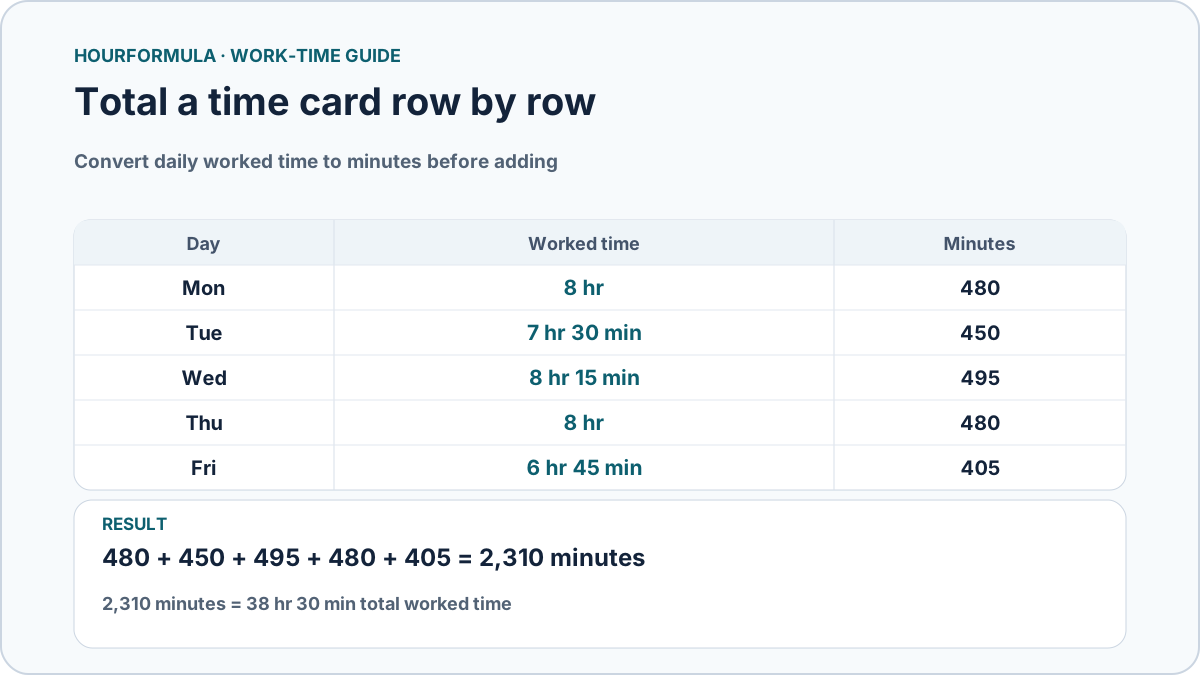
This five-day time card shows the clock entries and break deductions behind each daily total, rather than only listing the final worked durations.
| Day | Clock in–out | Unpaid break | Worked time | Minutes |
|---|---|---|---|---|
| Monday | 8:00 AM–4:30 PM | 30 min | 8 hr | 480 |
| Tuesday | 8:15 AM–4:15 PM | 30 min | 7 hr 30 min | 450 |
| Wednesday | 8:00 AM–4:45 PM | 30 min | 8 hr 15 min | 495 |
| Thursday | 9:00 AM–5:30 PM | 30 min | 8 hr | 480 |
| Friday | 9:00 AM–4:15 PM | 30 min | 6 hr 45 min | 405 |
Once every row is checked, add the worked minutes, not the clock times or elapsed shift lengths:
480 + 450 + 495 + 480 + 405 = 2,310 minutes
2,310 minutes = 38 hr 30 min
The five daily totals also match the reference diagram above. Each row has already had its unpaid break deducted, so subtracting those breaks again from the 2,310-minute weekly total would undercount the work.
How to handle an overnight row
If a row has a clock-out earlier than its clock-in, it may represent an overnight shift.
Example:
- Clock in: 10:00 PM
- Clock out: 6:00 AM
- Unpaid break: 30 min
Elapsed duration:
8 hr
Worked duration:
7 hr 30 min
Add 7 hr 30 min to the weekly total, not a negative same-day difference.
What should happen with blank days?
A genuinely blank day with no work contributes zero.
However, an incomplete row is different from a blank day.
For example:
- no clock-in and no clock-out → likely no entered shift;
- clock-in present but clock-out missing → incomplete entry;
- clock-out present but clock-in missing → incomplete entry.
A calculator should not silently invent missing times.
Time-card hours and decimal hours
A total such as:
40 hr 30 min
equals:
40.50 decimal hours
because:
30 ÷ 60 = 0.50
A total of:
40 hr 45 min
equals:
40.75 decimal hours
Do not interpret 40:30 as 40.30 decimal hours.
Optional pay estimates come after the time total
If a time card also estimates pay, calculate worked time first.
Then, using the selected arithmetic inputs, the total may be separated into regular and overtime portions before applying an hourly rate. For example, the 38 hr 30 min card above has 38.50 regular hours and zero overtime hours under a chosen 40-hour weekly threshold. A different threshold or applicable employment rule may produce a different classification.
Keep time calculation and pay calculation conceptually separate.
A blank rate means no pay estimate is needed. A rate of zero is an explicit numerical value and is different from a blank field.
Any pay result is an arithmetic estimate and does not determine employment-law eligibility, taxes, deductions, or employer policy.
Common time-card mistakes
Common errors include:
- adding clock times instead of daily durations;
- forgetting unpaid breaks;
- treating overnight clock-out as a same-day time;
- converting 30 minutes to 0.30 decimal hours;
- rounding every day before adding the week;
- treating incomplete rows as valid completed shifts;
- subtracting a break that was already excluded from the recorded time.