
How to Calculate Weekly Work Hours
To calculate weekly work hours, calculate the worked duration for each day, then add the daily totals together.
The safest method is to total minutes, then convert the final weekly total back into hours and minutes or decimal hours.
Weekly worked time = sum of each day's worked time
For example, five 8-hour days equal:
5 × 8 = 40 hours
But real schedules often include different start times, break lengths, partial days, or overnight shifts, so calculating each day separately is more reliable.
 View larger image
Calculate each day first
For every completed workday:
- Find the elapsed time between clock-in and clock-out.
- Handle midnight rollover if the shift is overnight.
- Subtract unpaid breaks.
- Record the resulting worked duration.
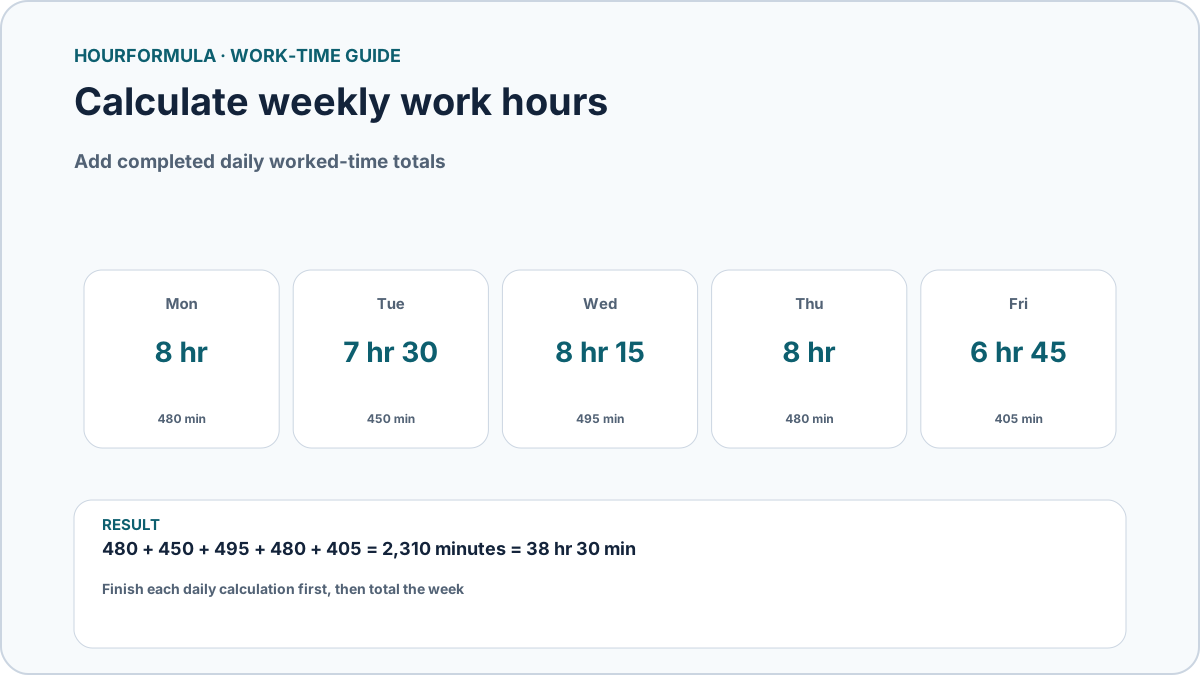
Example week:
| Day | Worked time |
|---|---|
| Monday | 8 hr |
| Tuesday | 7 hr 30 min |
| Wednesday | 8 hr 15 min |
| Thursday | 8 hr |
| Friday | 6 hr 45 min |
Do not combine raw clock-in and clock-out values across several days. Finish each daily calculation first.
Add hours and minutes
Using the example above, add the whole hours:
8 + 7 + 8 + 8 + 6 = 37 hours
Then add the minutes:
0 + 30 + 15 + 0 + 45 = 90 minutes
90 minutes equals:
1 hr 30 min
Add that to the 37-hour subtotal:
38 hr 30 min
So the weekly total is 38 hours 30 minutes.
Why totaling minutes is easier
Another method is to convert every daily result to minutes.
Example:
- 8 hr = 480 min
- 7 hr 30 min = 450 min
- 8 hr 15 min = 495 min
- 8 hr = 480 min
- 6 hr 45 min = 405 min
Total:
480 + 450 + 495 + 480 + 405 = 2,310 minutes
Convert back:
2,310 ÷ 60 = 38 hours with 30 minutes remaining.
Result:
38 hr 30 min
This approach avoids mistakes when minute totals exceed 60. These are already-calculated worked durations; if unpaid breaks were removed when calculating each day, do not subtract them a second time from the weekly sum.
Weekly hours with unpaid breaks
If your daily shift totals are based on raw clock-in and clock-out times, subtract unpaid breaks before adding the week.
Example Monday:
- 8:00 AM–4:30 PM = 8 hr 30 min elapsed
- 30-minute unpaid lunch
- worked time = 8 hr
Tuesday:
- 8:00 AM–5:00 PM = 9 hr elapsed
- 60-minute unpaid lunch
- worked time = 8 hr
Both days contribute 8 worked hours even though their elapsed spans are different.
What about blank or non-work days?
A day with no shift contributes zero hours. That is different from a shift with incomplete clock-in or clock-out information, which must be checked before it is totaled.
For a separate example using the week above, suppose Wednesday's 8 hr 15 min was not worked after all and the other four daily durations stay unchanged. Remove Wednesday's 495 minutes from the weekly total:
2,310 − 495 = 1,815 minutes = 30 hr 15 min
Leave genuine non-work days at zero. Do not invent times to fill a blank day or assume that a partially recorded shift lasted zero hours.
How overnight shifts fit into a weekly total
Calculate the overnight duration before adding it to the week.
For example:
10:00 PM–6:00 AM = 8 elapsed hours.
With a 30-minute unpaid break:
7 hr 30 min worked
That daily result can then be added to the remaining days normally.
Convert weekly hours to decimal hours
A weekly total of:
38 hr 30 min
becomes:
38 + 30 ÷ 60 = 38.50 hours
A total of 38 hr 45 min becomes:
38.75 hours
Do not write 38 hr 30 min as 38.30 decimal hours.
Weekly totals and overtime
A weekly total tells you how much time was worked.
Splitting that total into regular and overtime hours is a separate calculation using a selected threshold.
For example, under a purely mathematical 40-hour threshold:
- total = 45 hr
- regular portion = 40 hr
- amount above threshold = 5 hr
This arithmetic does not determine legal overtime eligibility or which threshold applies to a particular worker.
Common weekly-hours mistakes
Avoid:
- converting 30 minutes to 0.30 hours;
- forgetting unpaid breaks;
- rounding each day before totaling;
- treating incomplete entries as zero without reviewing them;
- calculating overnight shifts as same-day shifts;
- mixing elapsed shift duration with net worked duration.
Calculate weekly hours automatically
Use the Weekly Hours Calculator when you have each day's worked hours and minutes ready to enter. If you need to calculate those durations from clock-in, clock-out, and unpaid breaks, start with the Time Card Calculator instead.