
How to Add Business Days to a Date
To add business days to a date in Hourformula, move forward one calendar date at a time and count only eligible Monday-through-Friday dates.
The starting date itself is not counted.
Result date = start date + requested number of eligible business days
Supported manual exclusions are skipped in addition to weekends.
 View larger image
The start date is day zero
If you add one business day to Friday, Friday is not counted as day one.
The calculator moves forward. Saturday and Sunday are skipped, so Monday becomes the first eligible business day.
Friday + 1 business day = Monday
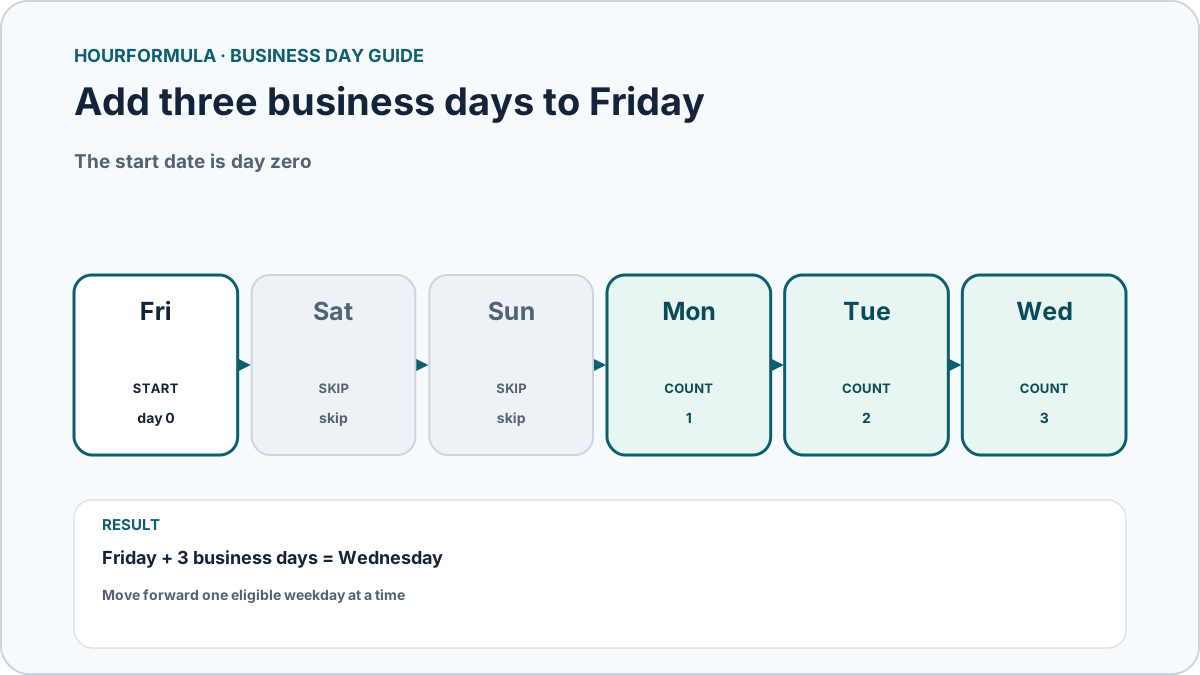
Example: add three business days to Friday
Assume there are no manual exclusions.
- Saturday: weekend, do not count;
- Sunday: weekend, do not count;
- Monday: business day 1;
- Tuesday: business day 2;
- Wednesday: business day 3.
Result:
Friday + 3 business days = Wednesday
What if the start date is on a weekend?
The start still acts as day zero.
For example, adding one business day to Saturday moves forward through Sunday without counting it, then counts Monday as the first business day.
Saturday + 1 business day = Monday
Adding zero business days is different: Hourformula returns the original start date unchanged, even if that date is a weekend.
How manual exclusions change the result
If Monday is normally the first eligible date after Friday but you manually exclude that Monday, the calculator continues to Tuesday.
Friday + 1 business day, with Monday excluded = Tuesday
Only exclusions that would otherwise be eligible weekdays can extend the calculation. Excluding Saturday or Sunday has no additional effect.
Example table
| Start | Add | Exclusions | Result |
|---|---|---|---|
| Friday | 1 business day | None | Monday |
| Friday | 3 business days | None | Wednesday |
| Saturday | 1 business day | None | Monday |
| Friday | 1 business day | Following Monday | Tuesday |
Business days are not calendar days
Adding three calendar days to Friday reaches Monday.
Adding three business days to Friday reaches Wednesday under the Monday-through-Friday model.
The two calculations answer different questions because business-day arithmetic deliberately skips ineligible dates.
What Hourformula does not determine
The calculator does not automatically know public holidays or external deadline rules.
If a real-world deadline uses a specific holiday calendar, supply applicable exclusions where supported and confirm any separate endpoint or deadline convention required by that system.